
Importing email contact lists to SendBlaster from the webmail Gmail is really simple: take a look at our brief tutorial!
First you need to export from Google Gmail your contacts in CSV common file format.
-
Open Google Gmail webmail in you browser
-
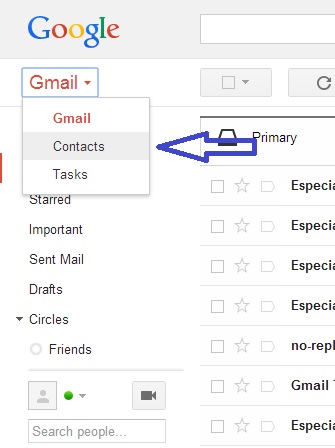
Click Gmail at the top-left corner of your Gmail page, then choose Contacts.
-
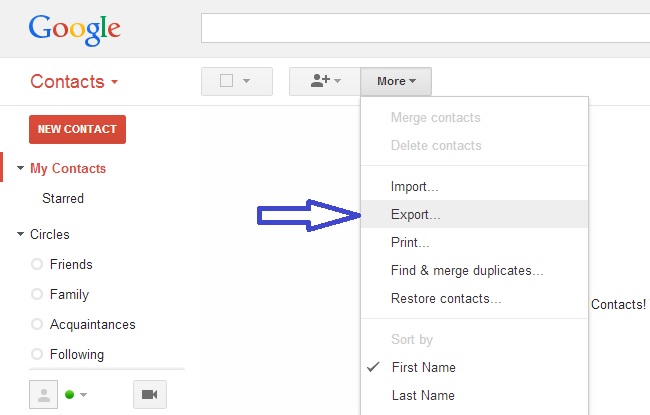
From the More drop-down menu, select Export…
-
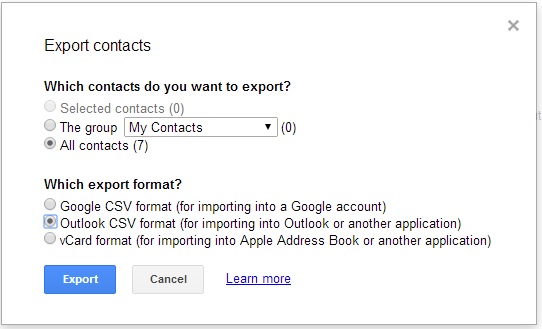
Choose whether to export all contacts or only one group.
-
Choose Outlook CSV format.
-
Click Export.
-
Choose Save to Disk then click OK.
-
Select a location to save your file, and click OK.
Now click here to learn how to import a CSV contact file into SendBlaster Newsletter Software.