
Building an email marketing website ready for a free email marketing software bulk email delivery can be pretty easy using open source and free softwares like WordPress and SendBlaster Bulk Emailer Free edition.
Free tutorial download sources
- here you can download latest WordPress CMS platform (5 minutes installation)
- here you find the sidebar widget for WordPress newsletter subscription plugin
- here you find the free bulk emailer for mass emailings
Warm up for an email marketing software ready website
First step will be building a WordPress website and publishing your contents. Before the first website public presentation you will configure the WordPress opt-in widget for newsletter subscription. While you write and publish your contents, as time goes by, new subscribers will join the mailing list. Please pay attention on the fact that these subscribers are people interested in your contents: they are waiting for your words and they trust your newsletters. You will soon build up a subscribed user-base mailing list of loyal and thirsty readers.
Email newsletter setup: using the email marketing program
After we install and configure SendBlaster Email Marketing Program, the next step will be:
Understanding the right timing for your emailings. Once a week, or once in a year?
We are constantly overloaded by information, you will be the more successful in your business if you send only interesting mailings. We believe in quality: speak only when you've got something good to say. This will give you a credibility aura among your readers. Email marketing: the building process. WordPress email marketing is a fast way to hot start your website… while building the mailing list user-base will take some time. You find online many email-addresses sellers, they give you hundred of thousands of generic emails addresses of strangers… Analyze the effect of a word spoken from a stranger… and the response to a word spoken from someone you trust since a long time, someone who speaks your business' language.
Always include a newsletter unsubscribe link in your mass emails
We should always give our readers the option to unsubscribe from our newsletter. Remember that Email marketing means keeping in contact with your customers… you will never get in contact with someone who dislikes or doesn't care about your words.
Mailing List size
While your list is small you can send your emails for free using your actual internet provider SMTP service, and SendBlaster Free edition (up to 100 emails). When your mailing list will grow up, consider the
mass email program: sending license for SendBlaster PRO bulk emailer program.
WordPress double optin widget bulk email plugin for newsletter subscription
File size: 7,7 kbytes (.zip file)
Format: WordPress sidebar widget plugin for newsletter
Release: 1.1.6 WordPress versions: from 2.0 to 2.6.x
WP mailing list management Plugin Features
-
user can subscribe and unsubscribe to your mailing list
-
closed loop double-opt-in feature for polite and legal bulk email senders
-
build a mailing list inside WordPress
-
manage the mailing list inside WordPress
-
bulk email WordPress newsletter subscribers using a free bulk email software
-
compatible with email sender softwares
-
compatible with SendBlaster
-
validates w3's xhtml strict
WP Widget Description
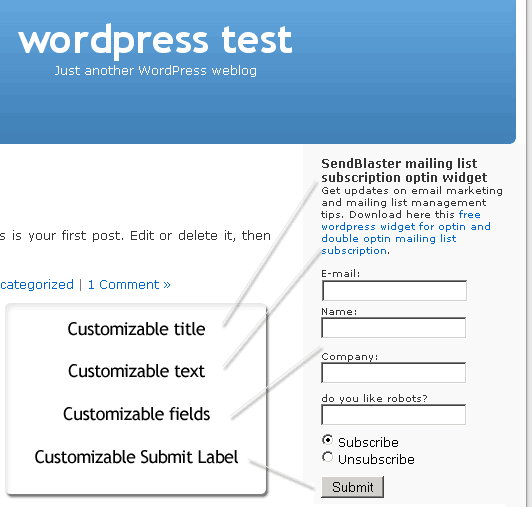
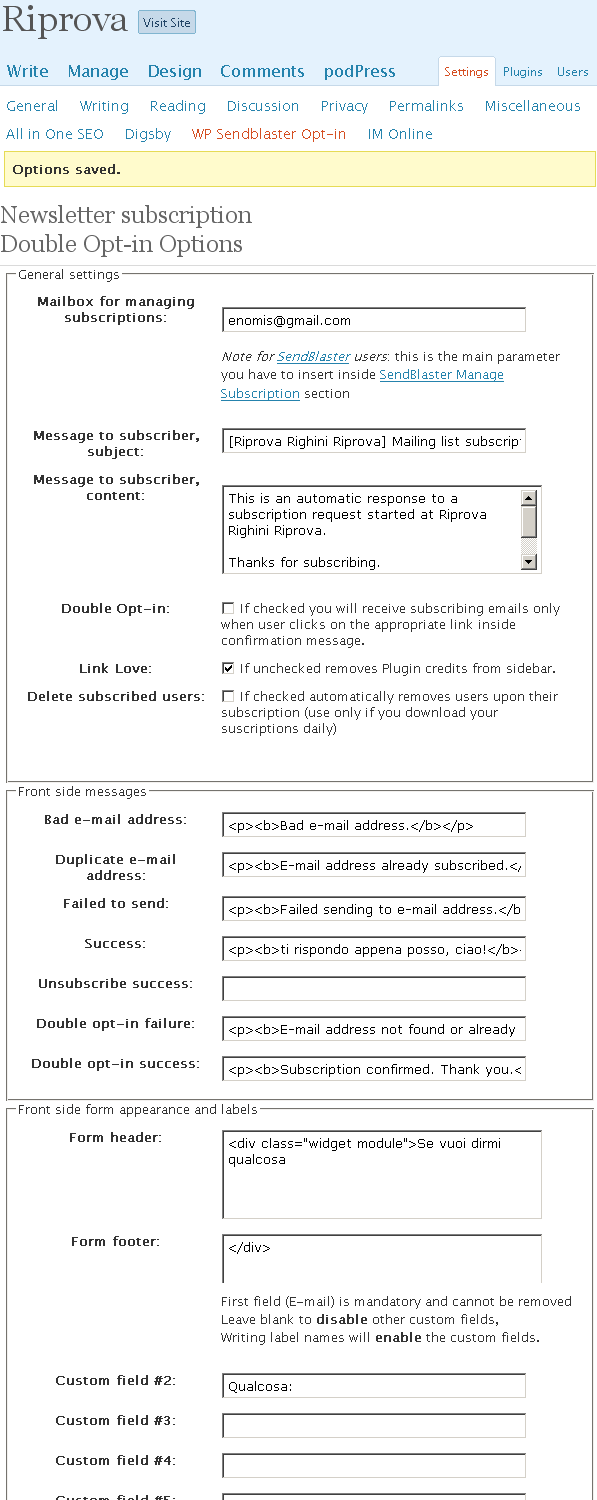
This simple WordPress mailing list management widget (plugin) sends emails with "Subscribe" and "Unsubscribe" subject for newsletter opt-in and double opt-in email list management. New mailing list subscriptions are written in WordPress sidebar and new subscribers details are gathered into your bulk email software or mailing list management software. The email list widget works with common bulk emailers and with SendBlaster's newsletter software subscription management with custom field integration, for email merge purposes. The widget adds an options tab to customize settings:
-
Mailbox for managing subscriptions
-
Message to subscriber – subject
-
Message to subscriber – content
-
Double Opt-in
-
Link Love (disable or enable)
-
Sidebar Front side messages
-
Sidebar Front side appearance and custom fields
-
subscribe and unsubscribe label modify
-
Temporary database storing for newly mailing list subscribed members
This e-mail widget is compatible with K2 and Unsleepable sidebar management
WP Plugin installation
-
download plugin: free wordpress widget for mailing list subscription
-
unzip the file wpsb-opt-in.php
-
upload via FTP to your WordPress wp-content/plugins directory
-
enable plugin from WordPress Plug-ins Admin control panel
-
drag into your sidebar the new widget in Presentation/widgets control panel
-
configure Sendblaster mass email software for automatic new subscriptions download
Mass Email Marketing Workflow
New user subscriptions > mailing list > bulk email cycle
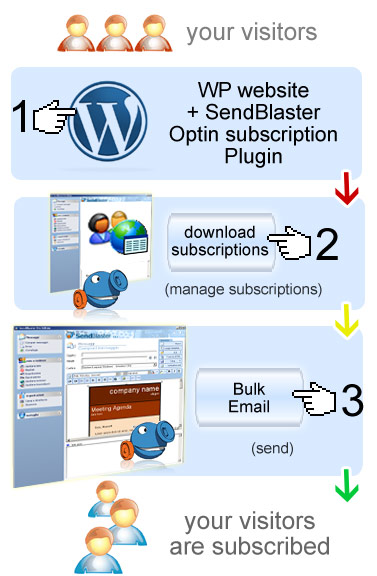
Go to wp-admin -> options -> WP sendblaster opt-in
-
Put your email address into > Mailbox for managing subscriptions.
-
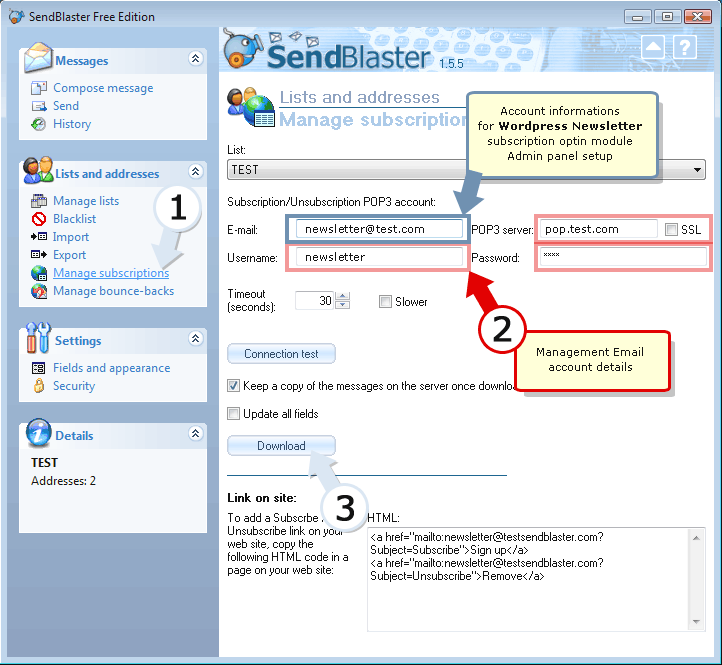
Open your installed SendBlaster, click on > Manage subscriptions
- Now write inside managing email address the same email address you used in the plugin configuration
-
Now, when a user subscribes through the wordpress plugin, an email will be sent to your managing email address, with a particular subject ("subscribe")
-
When inside SendBlaster you hit "Download" (in manage subscriptions section) the new subscriptions will be downloaded and added to you local list
-
Ready for mass email! (free download bulk email software)
Screenshot: sidebar newsletter subscription plug in
Other Mailing list WordPress plugins
Here's how to export to CSV file your wordpress users and comments to a valid SendBlaster .CSV file.